Make a Note: A Sweet Handwritten Font
There I was, staring at a blank brand board, trying to find the right visual voice for a small bakery’s rebrand. The client wanted something warm, approachable, and a little nostalgic—like the smell of fresh bread and buttery pastries. I reached for a few script fonts, testing them on logo concepts, packaging mockups, and social media headers. That’s when I came across Make a Note.
A Classic Script with a Personal Touch
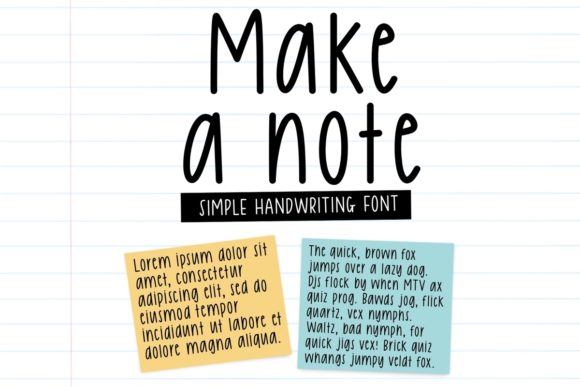
Make a Note is a classic handwritten font that feels like it was drawn with a pen and paper. It has a natural flow, with soft curves and gentle swashes that give it a friendly, almost intimate vibe. The font’s personality is warm and inviting, making it perfect for brands that want to feel more human and less corporate.
Its visual characteristics are clean but not sterile. The strokes vary slightly, which adds character without being too chaotic. It’s not overly ornate, so it doesn’t get lost in busy designs. Instead, it sits nicely on the page, offering a balance between elegance and simplicity.
Testing Make a Note in Real Branding Work
I used Make a Note in several design assets for the bakery project. On the logo, it added a sense of authenticity and craftsmanship. For the packaging, it worked well as a headline font, paired with a modern sans serif for contrast. On business cards, it gave a personal touch that stood out from the usual typography.
On a website header, Make a Note felt just right—neither too bold nor too subtle. It caught the eye without overwhelming the reader. In social media graphics, it helped create a cohesive look across different platforms, reinforcing the brand’s identity with every post.
One of the most rewarding moments was seeing it on a shop sign. The font had a handcrafted feel that matched the bakery’s aesthetic perfectly. It wasn’t just a typeface; it became part of the story.
When to Use Make a Note
Make a Note excels as a display or headline font. It works best for short phrases, logos, and branding elements where personality matters. It’s ideal for creative studios, handmade shops, and boutique brands looking to add a personal, artisanal touch to their visuals.
It’s not the best choice for long body text or formal corporate use. At smaller sizes, the details can become hard to read, especially in low-contrast settings. For those situations, a more structured typeface would be more appropriate.
That said, when used intentionally, Make a Note can elevate a design. It adds a layer of warmth and charm that other fonts might lack. It’s especially effective when paired with a serif or sans serif font for balance and clarity.
Font Pairing and Design Applications
Pairing Make a Note with a serif font like Playfair Display or a clean sans serif like Lato creates a nice contrast. The script font brings personality, while the other typefaces provide structure and readability. This combination works well for editorial design, packaging, and web headers.
For a more playful look, pairing it with another handwritten font can add depth. But be careful not to overdo it—too many script fonts can make a design feel cluttered. A single, well-chosen script like Make a Note is often enough to make an impact.
In commercial design, Make a Note can be used for product labels, signage, and promotional materials. Its versatility makes it a go-to choice for brands that want to maintain a consistent, recognizable identity across different mediums.
Practical Tips for Using Make a Note
If you’re considering using Make a Note in your next project, test it thoroughly. Try it on different backgrounds, sizes, and layouts to see how it performs. Pay attention to legibility, especially in digital formats where screen resolution can affect detail.
Check the font’s file formats and webfont availability. Make sure it’s compatible with your design software and that you have the right license for commercial use. Always review the licensing terms before using the font in client work, packaging, or print-on-demand products.
Make a Note is a premium font that offers a lot of value for its price. It’s a great addition to any designer’s toolkit, especially for projects that benefit from a personal, handwritten touch.